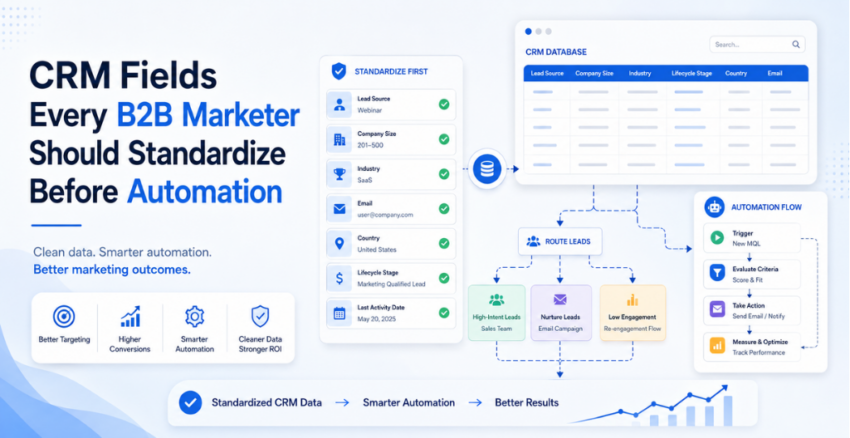
Every B2B marketer wants better automation. Faster lead routing. Cleaner attribution. Smarter nurture journeys. Better lead scoring. Stronger reporting.
But automation does not fail only because the tool is weak. It often fails because the CRM is messy.
The CRM fields B2B marketers should standardize before automation are the fields that tell your systems who the lead is, where the lead came from, what the lead did, how good the fit is, and whether sales should act now.
If those fields are messy, automation will not fix your funnel. It will help you fail faster.
Poor data quality is not a small admin issue either. Gartner says poor data quality costs organizations at least $12.9 million a year on average. That is why CRM data standardization is not “cleanup work.” It is the foundation of revenue marketing.
Quick Answer: Which CRM Fields Should B2B Marketers Standardize?
B2B marketers should standardize five CRM field groups before automation: firmographic data, role and persona data, lead source and UTM data, behavioral intent fields, and consent or compliance fields. These fields control lead routing, lead scoring, segmentation, nurture workflows, attribution, sales handoff, and AI-assisted marketing workflows.
Table of Contents
- The Monday Morning Tab Nightmare
- Why CRM Field Standardization Matters Before Automation
- The 5 CRM Field Groups to Standardize
- The $50K Tech Waste Reality Check
- How CRM Fields Fix Sales and Marketing Handoff
- The 3-Question Automation-Ready Audit
- Common CRM Field Mistakes to Avoid
- FAQs
- Final Takeaway
The Monday Morning Tab Nightmare
You know the scene.
It is Monday morning. You open LinkedIn Campaign Manager, Google Analytics, Meta Ads, your email platform, your landing page tool, the CRM, and a spreadsheet someone from sales sent on Friday evening.
Twelve tabs later, the story still does not match.
LinkedIn says one campaign worked.
GA4 shows another channel brought the traffic.
Your CRM says half the leads came from “Other.”
Sales says the leads are weak.
Your email tool says engagement looks healthy.
Then leadership asks the one question nobody can answer cleanly:
“What actually created pipeline?”
That is the dashboard nightmare.
But the real problem is not the dashboard.
The real problem is the CRM field map behind it.
One tool says “United States.” Another says “USA.” One field says “IT Services.” Another says “Information Technology.” One contact has “VP Marketing.” Another has “Vice President, Growth.” One lead source says “LinkedIn.” Another says “linkedin_paid.” Another says “Social.”
Now build automation on top of that.
Lead routing breaks.
Attribution gets questioned.
Sales loses trust.
Marketing spends time defending numbers instead of improving campaigns.
That is why the CRM fields B2B marketers should standardize need to be fixed before automation, not after.
Salesforce’s 2026 State of Sales research also points to the same issue: sales teams are pushing for better data quality and accuracy as AI and automation become more important to revenue teams.
Why CRM Field Standardization Matters Before Automation
CRM field standardization means your team agrees on the field name, format, values, rules, and owner.
For example, “Company Size” should not have ten different formats:
- 51 to 200
- 51-200
- 50+
- Mid-market
- SMB
- Small Business
Pick one structure.
Use it everywhere.
This matters because B2B marketing automation depends on field logic.
Lead routing depends on country, region, product interest, company size, and account ownership.
Lead scoring depends on persona, fit, intent, lifecycle stage, and behavior.
Attribution depends on original source, latest source, campaign name, UTM fields, and conversion page.
Nurture workflows depend on stage, industry, pain point, and consent.
AI workflows depend on clean context.
So if the CRM fields are inconsistent, every workflow built on top becomes unreliable.
That is why CRM data hygiene is not backend work. It is marketing infrastructure.
If you are planning to connect CRM, automation, analytics, and AI workflows, start with the bigger system view. I have covered that in detail in my guide on building an AI-powered marketing system.
The 5 CRM Field Groups to Standardize
1. Firmographic Data
Firmographic data tells you what kind of company the lead belongs to.
These are the B2B CRM fields you should clean first:
| CRM Field | Recommended Format | Why It Matters |
|---|---|---|
| Company Name | Normalized account name | Prevents duplicate accounts |
| Industry | Dropdown list | Supports segmentation and scoring |
| Company Size | Fixed ranges | Helps fit scoring |
| Annual Revenue | Fixed ranges | Helps account qualification |
| Country | Standard country format | Supports routing and compliance |
| Region | NA, EMEA, APAC, India, MEA | Supports sales assignment |
| Company Type | SaaS, IT Services, BFSI, Healthcare | Supports messaging |
Here is the common mistake.
A contact opens ten emails, clicks two links, and downloads a guide. The system gives that person a high engagement score.
But the company has five employees and will never buy your enterprise offer.
That is not a hot lead.
That is a false positive.
Firmographic fields help you separate activity from fit.
Without them, sales wastes time chasing leads that look active but will never convert.
2. Role and Persona Data
Role fields tell you who the person is inside the company.
These are the marketing automation CRM fields to standardize:
| CRM Field | Recommended Format | Why It Matters |
|---|---|---|
| Job Title | Raw text | Preserves the original title |
| Department | Marketing, IT, Sales, Finance, HR | Supports segmentation |
| Seniority | C-Level, VP, Director, Manager, IC | Supports scoring |
| Persona | Decision Maker, Influencer, User, Researcher | Supports nurture logic |
| Buying Role | Economic Buyer, Technical Buyer, Champion | Supports sales follow-up |
Job titles are messy.
One company has a “Head of Growth.” Another has “VP Marketing.” Another has “Demand Generation Lead.” All three may belong to the same persona group.
So keep the raw job title, but also create a normalized persona field.
That small step makes lead scoring, email segmentation, and sales routing much cleaner.
A simple lead scoring model may look like this:
| Singal | Score |
|---|---|
| C-level or VP title | +20 |
| Director title | +15 |
| Manager title | +8 |
| Student or intern | -15 |
| Career page visitor | -10 |
The point is simple.
If you do not standardize role and persona data, automation cannot understand who is worth routing to sales.
3. Lead Source and UTM Fields
Lead source fields tell you where demand came from.
This is where B2B marketing reporting often breaks.
Standardize these fields before running serious automation:
| CRM Field | Example |
|---|---|
| Original Lead Source | LinkedIn, Google, Organic, Referral |
| Latest Lead Source | Webinar, Email, Retargeting |
| UTM Source | linkedin, google, newsletter |
| UTM Medium | paid_social, cpc, email |
| UTM Campaign | crm_fields_automation |
| UTM Content | carousel_v1, banner_a |
| UTM Term | keyword or audience segment |
| Landing Page URL | Full URL |
| Conversion Page | Demo page, guide download, webinar form |
Do not let every marketer create their own UTM structure.
That is how attribution dies.
Use lowercase. Pick hyphens or underscores. Stay consistent. Avoid campaign names like:
Q3 test final new version 2
Use something cleaner:
utm_source=linkedin
utm_medium=paid_social
utm_campaign=crm_fields_automation
utm_content=carousel_v1
If UTM fields are inconsistent, marketing-sourced revenue will always be questioned. And sales will be right to question it.
Once your UTM and CRM source fields are clean, the next step is proving business impact. My guide on marketing ROI using GA4 explains how to connect campaign tracking with leadership-ready reporting.
4. Behavioral Intent Fields
Behavioral fields tell you what the lead did.
But not all actions are equal.
A blog visit is not the same as a pricing page visit.
A newsletter open is not the same as a demo request.
Standardize these fields:
| CRM Field | What It Tracks |
|---|---|
| Last Website Activity | Most recent meaningful action |
| High-Intent Page Visited | Pricing, demo, comparison, product page |
| Content Downloaded | Guide, checklist, report |
| Webinar Attended | Yes or no |
| Demo Requested | Yes or no |
| Product Interest | CRM, automation, analytics, AI |
| Fit Score | Company and persona match |
| Engagement Score | Activity level |
| Intent Score | Buying signal strength |
Here is the rule I prefer:
Separate interest from intent.
A person who reads your blog may be interested.
A person who visits your pricing page twice, checks a comparison page, and fills a demo form is showing buying intent.
If both actions get treated the same, your system will over-alert sales. That is how sales stops trusting MQLs.
Clean intent fields also improve AI-assisted marketing work. When your CRM data is structured, prompts become sharper. I have shared practical examples in my guide on AI prompts for B2B marketers.
5. Privacy, Consent, and Compliance Fields
Consent fields protect the business.
Standardize these fields before email automation, enrichment, retargeting, and AI-assisted workflows.
| CRM Field | Why It Matters |
|---|---|
| Email Opt-In Status | Controls campaign eligibility |
| Consent Source | Shows where consent came from |
| Consent Timestamp | Supports audit trail |
| Country or Region | Supports privacy rules |
| Unsubscribe Status | Prevents unwanted sends |
| Data Processing Consent | Supports compliance workflows |
| Do Not Contact | Protects sales and marketing |
| Consent Notes | Gives context when needed |
If your CRM does not clearly track consent, automation can send the wrong message to the wrong person.
That is not only bad marketing.
It can become a legal and trust problem.
So before you automate nurture workflows, outbound sequences, or remarketing audiences, clean your consent fields.
The $50K Tech Waste Reality Check
Here is the painful truth.
Many teams buy expensive platforms before fixing basic data.
They want AI personalization, predictive scoring, multi-touch attribution, and advanced nurture campaigns.
But they have not standardized industry, region, persona, lifecycle stage, lead source, or consent.
That is how a team can spend serious money on marketing automation and still run reporting from spreadsheets.
Start with simple workflows first.
| Automation Use Case | Setup Time | Complexity | Time to Value |
|---|---|---|---|
| Welcome sequence | 1 to 2 weeks | Low | 30 days |
| Basic lead scoring | 2 to 3 weeks | Low | 60 days |
| Nurture campaign | 3 to 4 weeks | Medium | 60 to 90 days |
| Lead routing workflow | 3 to 5 weeks | Medium | 60 to 90 days |
| Multi-touch attribution | 6 to 10 weeks | High | 90 to 180 days |
| Predictive scoring | 12 to 16 weeks | Very high | 180 to 360 days |
Do not start with predictive scoring if you cannot trust your lifecycle stage field.
Do not build AI email personalization if persona data is missing.
Do not build attribution dashboards if UTM fields are inconsistent.
Clean data first. Automation second.
Tool choice matters, but only after the workflow is clear. If you are comparing automation platforms, my breakdown of Make vs Zapier vs n8n will help you choose based on workflow complexity, not hype.
How CRM Fields Fix Sales and Marketing Handoff
This is where CRM field standardization becomes a sales alignment issue.
Sales says marketing leads are weak.
Marketing says sales is too slow.
Both may be right.
The fix is not another meeting.
The fix is a shared definition inside the CRM.
Standardize these handoff fields:
| CRM Field | Why It Matters |
|---|---|
| Lifecycle Stage | Defines where the lead sits |
| Lead Status | Shows current sales action |
| MQL Date | Tracks when marketing passed the lead |
| SQL Date | Tracks when sales accepted it |
| Sales Accepted Lead | Yes or no |
| Disqualification Reason | Shows why sales rejected it |
| Next Follow-Up Date | Prevents lead neglect |
| Owner | Shows who is responsible |
| SLA Status | Tracks if follow-up is late |
The handoff breaks when these fields are unclear.
Marketing marks a lead as MQL because the person downloaded three assets.
Sales ignores it because the company is too small.
Marketing gets frustrated.
Sales gets blamed.
But the real issue is weak field logic.
A better MQL definition may include:
- Right company size
- Right region
- Relevant persona
- Valid business email
- Clear product interest
- One or more high-intent actions
- Consent to contact
- No disqualification flag
That is how sales and marketing alignment becomes operational.
Not a slogan. Not a dashboard. A field map.
This is also where a clear human-AI marketing workflow helps. AI can support research, scoring, and drafting, but humans still need to define lead quality, review exceptions, and approve key decisions.
The 3-Question Automation-Ready Audit
Before you automate, ask these three questions. If the answer is weak, fix the CRM data first.
Is your CRM data clean and consistent?
Check:
- Are required fields filled?
- Are dropdown values standardized?
- Are duplicate accounts merged?
- Are job titles normalized into personas?
- Are lead sources consistent?
- Are countries and regions formatted properly?
Do sales and marketing agree on a qualified lead?
Check:
- Is the MQL definition documented?
- Does sales agree with the fit criteria?
- Are disqualification reasons tracked?
- Is there an SLA for follow-up?
- Does marketing know which leads sales rejects most often?
Can you track a lead from first touch to closed deal?
Check:
- Is original source captured?
- Are UTM fields stored in the CRM?
- Is campaign influence visible?
- Are opportunity records connected?
- Can you report pipeline by source?
- Can you see MQL to SQL conversion?
Common CRM Field Mistakes to Avoid
Most automation issues do not start with the tool. They start with weak field logic, poor ownership, and messy CRM habits.
Too Many Open Text Fields
Open text fields feel flexible.
But they destroy reporting.
Use dropdowns for fields like industry, region, company size, lead source, lifecycle stage, and disqualification reason.
No Field Owner
Every important field needs an owner.
Marketing may own source and campaign fields. Sales may own lead status and disqualification reason. RevOps may own lifecycle stages and routing rules.
No owner means no accountability.
Mixing Fit and Engagement
A student can read 10 blogs.
That does not make them a sales-ready lead.
Separate fit score, engagement score, and intent score. This improves lead quality and sales trust.
No Disqualification Reason
If sales rejects a lead, capture why.
Common reasons include wrong industry, too small, no budget, wrong geography, competitor, student, or no current need.
This field helps marketing improve targeting.
Not Auditing Fields Quarterly
CRM quality decays.
People change jobs. Companies rebrand. Emails bounce. Regions shift. Buying committees change.
Cleanlist’s 2026 B2B data decay resource cites 22% annual B2B data decay and explains that job changes can invalidate many contact fields. Treat vendor data like this as directional, but take the warning seriously: CRM data hygiene needs a recurring process, not a one-time cleanup.
Run a quarterly field audit. At minimum, review:
- Missing required fields
- Duplicate accounts
- Invalid emails
- Unknown lead source values
- Unused picklist values
- Unmapped UTM fields
- Rejected MQL reasons
- SLA misses
Final Takeaway
CRM automation does not start with workflows.
It starts with field discipline.
The CRM fields B2B marketers should standardize are not boring admin fields. They are the control system for routing, scoring, attribution, nurture, compliance, sales alignment, and AI workflows.
If those fields are clean, automation becomes useful.
If they are messy, automation becomes expensive confusion.
So before buying another tool or launching another workflow, fix the field map.
Clean fields first.
Automation second.
FAQs
What CRM fields should B2B marketers standardize before automation?
The CRM fields B2B marketers should standardize include firmographic data, role and persona data, lead source and UTM fields, behavioral intent fields, and consent fields. These fields control routing, scoring, nurture, attribution, and compliance.
Why is CRM data standardization important for marketing automation?
CRM data standardization helps automation tools make better decisions. If field values are inconsistent, lead routing, segmentation, scoring, reporting, and personalization can break.
What are the most important lead source fields in a CRM?
The most important lead source fields are original lead source, latest lead source, UTM source, UTM medium, UTM campaign, UTM content, landing page URL, and conversion page. These fields support attribution.
How often should B2B marketers audit CRM fields?
B2B marketers should run a CRM field audit every quarter. Fast-moving teams may need monthly checks for lead source, lifecycle stage, UTM values, email validity, duplicate records, and sales handoff fields.
What is the difference between fit score and engagement score?
Fit score measures whether the company and person match your ideal customer profile. Engagement score measures activity such as clicks, downloads, page visits, and email engagement. Strong scoring models separate both.
How do CRM fields improve sales and marketing alignment?
Standardized CRM fields create shared definitions for MQLs, SQLs, disqualification reasons, SLA status, and ownership. This reduces blame and helps both teams work from the same data.

Want to Collaborate?
Open to guest posts, partnerships, link collaborations, and marketing discussions. If you’re building something interesting, let’s connect.
Connect on LinkedIn