
Compare the best AI video creation tools for 2026. See top picks for marketers, B2B videos, avatars, social media, and fast content creation.
Which AI Video Creation Tool Actually Fits Your Workflow and Delivers Usable Output?
Quick Answer: The best AI video creation tool depends on your use case. InVideo AI is best for fast marketing videos, Synthesia is better for structured B2B content, and Runway is stronger for creative visuals.
What This Article Covers
-
1
Why AI video tools matter right now
-
2
Top AI video tools compared
-
3
Best AI video tools by use case
-
4
Common mistakes to avoid
-
5
How to choose the right tool
-
6
Final recommendation
Why AI Video Tools Matter Right Now
Video still drives engagement better than most formats. But traditional video production is slow, expensive, and hard to scale. That is the gap AI video tools are starting to close.
The Old Problem
Producing one good video often meant scripts, cameras, editing teams, revisions, approvals, and long turnaround times. That made video difficult for fast-moving marketing teams.
The New Shift
AI makes video production faster and more accessible. You can now move from idea to usable video asset without building a full production setup every time.
Now You Can Create More Video Assets, Faster
Create videos without cameras
Generate scripts automatically
Produce multiple variations quickly
Repurpose content across platforms
For B2B Teams, This Changes the Content Engine
AI video tools are not just for flashy social clips. They can help B2B teams produce useful, repeatable content across the full buyer journey.
- 1 Product demos
- 2 Explainer videos
- 3 Social content
- 4 Ad creatives
The goal is not perfection. The goal is speed with acceptable quality. That is what helps teams publish more, test faster, and learn what works.
What Makes the Best AI Video Creation Tool?
There’s no single “best” tool.
It depends on how you plan to use it.
Here’s how I evaluate them.
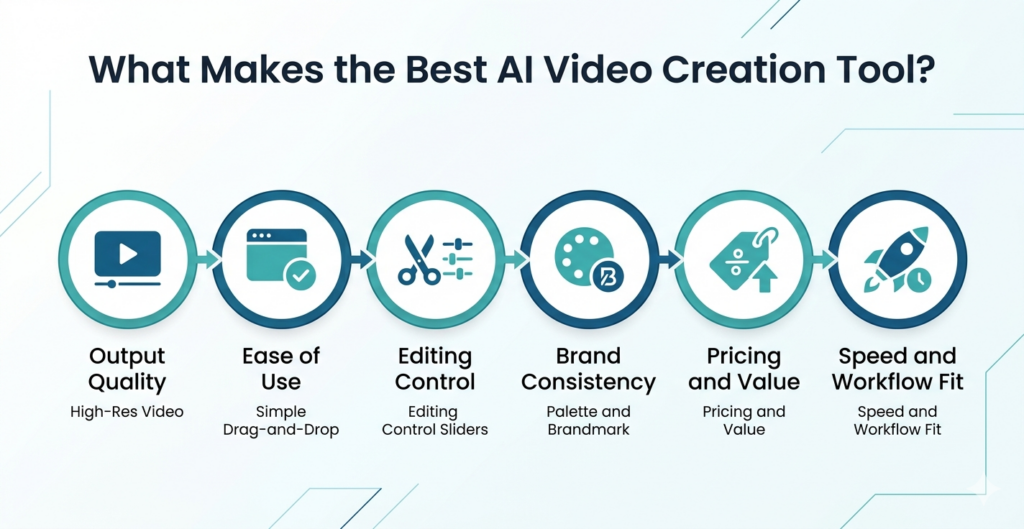
Output quality
Can it produce something usable without heavy editing?
Some tools look great in demos but break in real use.
Ease of use
Can your team use it without training?
If not, adoption drops fast.
Editing control
Can you tweak the output?
Many tools generate content but limit control.
Brand consistency
Can you maintain tone, visuals, and messaging?
This matters more for B2B teams.
Pricing and value
Does it justify the output?
Cheap tools often cost more in time.
Speed and workflow fit
Does it fit your content process?
Or does it create extra steps?
Best Email Marketing Tools for 2026: The Ultimate Guide for Marketers, Founders & Growth Teams
In this blog, I’ll break down the best email marketing tools for 2026, how they fit different business needs, and how you can use them to increase conversions, automation depth, and ROI.
Best AI Video Tools by Use Case
Let’s break this down by actual needs.
| Use Case | Recommended Tools | Best For | Key Strength | Try |
|---|---|---|---|---|
| Marketers | InVideo AI | Ads, social videos, blog repurposing | Fast content creation at scale | Invideo AI |
| Faceless Content | Pika, Runway | Abstract visuals, storytelling | No need for presenter or camera | Pika , Runway |
| Talking-Head Videos | HeyGen, Synthesia | Explainers, presentations | AI avatars with multilingual support | HeyGen, Synthesia |
| Cinematic Videos | Runway, Luma Dream Machine | Storytelling, high-quality visuals | Strong visual output and realism | Runway, Luma Dream Machine |
| Social Media Clips | InVideo AI, Pika | Short-form content | Quick turnaround and volume | InVideo AI, Pika |
| B2B Content Teams | Synthesia, HeyGen | Training, onboarding, product demos | Structured, scalable video creation | Synthesia, HeyGen |
How I Tested the Tools
I didn’t rely on demos.
I tested them in real scenarios.
Here’s what I looked at:
| Criteria | What I Checked |
|---|---|
| Prompt response | Does it understand intent? |
| Realism | Does output look usable? |
| Motion | Smooth or robotic? |
| Lip sync | Natural or off? |
| Editing | Can I adjust output? |
| Speed | Time to final output |
| Pricing | Cost vs value |
| Repurposing | Can content be reused? |
This matters because most tools perform well in one area—and fail in others.
Top AI Video Tools Compared
Different AI video tools solve different problems. Some are better for cinematic visuals. Some work better for talking-head videos, corporate training, short-form content, or marketing repurposing.
Runway
Best for: cinematic visuals
Strengths
- Strong output quality
- Good for creative storytelling
Limitation
- Limited control for structured content
Kling AI
Best for: experimental video
Strength
- Interesting results
Limitation
- Not reliable for marketing use
Luma Dream Machine
Best for: realistic video generation
Strength
- High-quality visuals
Limitation
- Still evolving
HeyGen
Best for: talking-head videos
Strengths
- Strong avatar quality
- Good for business content
Limitation
- Can feel repetitive
Synthesia
Best for: corporate and B2B videos
Strengths
- Reliable output
- Easy to scale
Limitation
- Limited creative flexibility
Pika
Best for: short-form creative videos
Strength
- Fast output
Limitation
- Less consistent
Google Veo
Best for: future-ready production
Strength
- High potential
Limitation
- Limited access
OpenAI Sora
Best for: advanced video generation
Strength
- High realism
Limitation
- Not widely available
Adobe Firefly Video
Best for: integration with Adobe tools
Strength
- Familiar workflow
Limitation
- Still developing
InVideo AI
Best for: marketing content
Strengths
- Fast creation
- Easy editing
- Good for repurposing
Limitation
- Output can feel templated
Quick recommendation: Use Runway or Luma for cinematic visuals, HeyGen or Synthesia for business videos, Pika for short-form experiments, and InVideo AI when you need fast marketing content at scale.
Which Tool Gives the Best ROI?
This is where decisions should happen.
Not features. ROI.
Here’s what actually matters:
| Factor | Impact |
|---|---|
| Time saved | Faster production |
| Content volume | More output |
| Repurposing | Better efficiency |
| Team usage | Higher adoption |
| Output quality | Less rework |
From experience:
👉 InVideo AI → best for volume
👉 Synthesia → best for structured content
👉 Runway → best for quality visuals
The best tool is the one your team uses consistently.
Mistakes People Make When Choosing AI Video Tools
Let’s keep this real. The best AI video tool is not always the cheapest, the most realistic, or the one everyone is talking about. For marketing teams, the right tool is the one that helps you create useful videos consistently.
Reality check: AI video tools can save time, but the wrong choice can create more editing work, inconsistent output, and videos that look impressive but do not support your marketing goals.
-
Buying the Cheapest Plan
Low cost often looks attractive, but it can create hidden costs later.
- Low quality output
- More editing work
- Wasted production time
-
Chasing Realism Only
High realism does not always mean useful output. A realistic video still fails if the message, structure, brand fit, and call-to-action are weak.
-
Ignoring Editing Control
If you can’t edit properly, you can’t scale. Marketers need control over scenes, text, voice, pacing, branding, captions, and final exports.
-
Skipping Brand Needs
Consistency matters more than random creativity in B2B. Your videos should match your tone, colors, audience, and campaign objective.
-
Using One Tool for Everything
No tool does everything well. Use one tool for cinematic visuals, another for talking-head videos, and another for quick marketing repurposing.
The Best AI Video Creation Tool Depends on Your Use Case
There is no single best AI video creation tool for everyone. The right choice depends on whether you need speed, structured business content, or creative visual output.
Choose InVideo
Best for fast marketing videos, repurposing content, and creating social-ready assets quickly.
Choose Synthesia
Best for B2B videos, training content, explainers, corporate communication, and repeatable formats.
Choose Runway
Best for cinematic visuals, creative storytelling, and more experimental visual production.
Don’t chase the best tool. Choose the one that fits your workflow. That is what actually scales content.
FAQs About the Best AI Video Creation Tools
1. What is the best AI video creation tool for marketers?
InVideo AI is one of the best AI video creation tools for marketers because it is fast, simple, and built for practical content creation. It works well for social media videos, ad creatives, explainer clips, and repurposing blog or script content into video.
2. Which AI video tool gives the most realistic results?
Runway and Luma Dream Machine are strong choices for realistic AI video generation. They are useful when you need cinematic visuals, creative storytelling, or high-quality generated scenes. However, they may need more editing control for structured marketing content.
3. Which AI video generator is best for social media?
InVideo AI and Pika are good AI video generators for social media content. InVideo AI works well for fast marketing videos and repurposing content, while Pika is useful for short-form creative clips, experiments, and visual-first social media posts.
4. Is AI video good for B2B marketing?
Yes, AI video is useful for B2B marketing, especially for product explainers, training videos, onboarding content, LinkedIn posts, ad creatives, and webinar repurposing. It helps teams create more video assets without depending on full production teams for every campaign.
5. How do I choose the right AI video tool?
Choose an AI video tool based on your use case first. If you need speed, choose InVideo AI. If you need structured business videos, choose Synthesia or HeyGen. If you need creative visuals, choose Runway or Luma Dream Machine.

Want to Collaborate?
Open to guest posts, partnerships, link collaborations, and marketing discussions. If you’re building something interesting, let’s connect.
Connect on LinkedIn