Sales teams do not need “more data.” They need usable data.
That is the real problem behind most B2B sales intelligence tool decisions. A team buys a large contact database, pushes thousands of records into the CRM, and then spends the next quarter fighting duplicates, bounced emails, weak lead sources, and sales complaints.
So when people compare ZoomInfo vs Apollo vs Lusha, the better question is not, “Which tool has the biggest database?”
The better question is: Which one fits your GTM workflow, CRM maturity, outbound motion, and budget?
Because a strong sales intelligence platform can help your team find accounts, enrich records, identify buyers, support outbound, and improve segmentation. But if your CRM fields are messy and your sales process is unclear, even the best tool can become an expensive contact dump.
Quick Answer: ZoomInfo vs Apollo vs Lusha
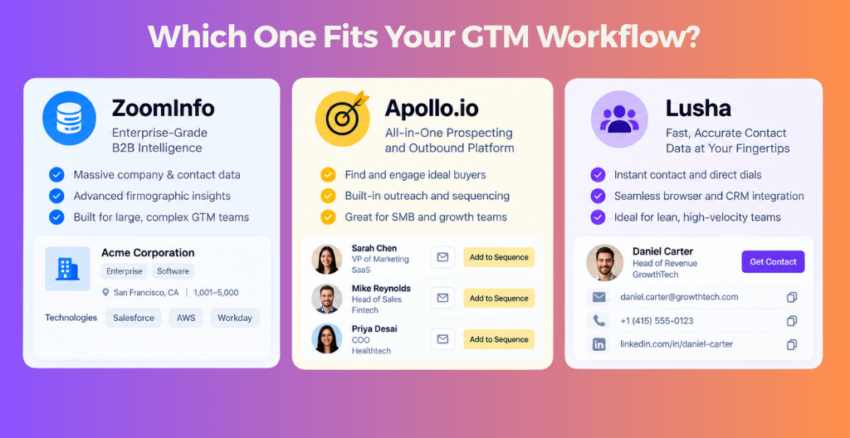
Choose ZoomInfo if you are a mid-market or enterprise GTM team that needs deeper account intelligence, intent signals, firmographic data, technographics, and broader revenue team use cases. ZoomInfo describes itself as a go-to-market software, data, and intelligence platform for sales, marketing, operations, and recruiting teams, with insights such as intent signals, decision-maker contact data, technologies used, org charts, company events, and firmographic attributes.
Choose Apollo.io if you want prospecting data, enrichment, email sequencing, sales engagement, and outbound execution inside one platform. Apollo’s pricing page highlights prospecting, Gmail and Salesforce extensions, sequences, CRM and API enrichment, multi-touch outreach, AI, and automation.
Choose Lusha if you want a simpler prospecting and enrichment workflow for contact data, buyer signals, CRM enrichment, and sales team productivity. Lusha positions its platform around verified contacts, company data, buyer intent, enrichment, APIs, CRM workflows, and integrations with tools like HubSpot, Make, n8n, Zoho, Microsoft Dynamics, Outreach, and Salesloft.
Table of Contents
- Why This Comparison Needs a GTM Workflow Lens
- ZoomInfo vs Apollo vs Lusha: Comparison Table
- Where ZoomInfo Fits Best
- Where Apollo.io Fits Best
- Where Lusha Fits Best
- The CRM Field Mapping Test
- Data Quality Reality Check
- Pricing and Budget Reality
- Best Tool by Team Type
- Mistakes to Avoid Before Buying
- Final Recommendation
- FAQs
Why This Comparison Needs a GTM Workflow Lens
Most comparison blogs look at features. That is useful, but not enough.
B2B teams do not buy sales intelligence tools only to “find contacts.” They buy them to improve prospecting, routing, segmentation, enrichment, outreach, reporting, and pipeline creation.
That means the tool has to fit your workflow.
A founder-led sales team does not need the same setup as a 40-person SDR team.
A RevOps-led enterprise team does not evaluate data the same way as a startup trying to launch outbound next week.
A marketing team using HubSpot or Zoho may care more about enrichment, segmentation, lifecycle stages, and source tracking. A sales team may care more about direct dials, verified emails, LinkedIn workflows, and sequences.
This guide compares ZoomInfo, Apollo, and Lusha through five practical filters:
- CRM fit
- Data quality needs
- Outbound workflow
- Team size
- Budget and operational maturity
ZoomInfo vs Apollo vs Lusha: Comparison Table
| Factor | ZoomInfo | Apollo.io | Lusha |
|---|---|---|---|
| Best fit | Mid-market and enterprise GTM teams | SMB, startup, and mid-market outbound teams | Small to mid-sized sales teams needing simpler prospecting |
| Core strength | Account intelligence, data depth, intent, enterprise workflows | Contact data plus outbound execution | Fast contact lookup, enrichment, and simpler workflows |
| Useful for marketing | Strong for account research, enrichment, segmentation, intent | Good for prospecting campaigns and outbound lists | Good for enrichment and focused prospecting |
| Useful for sales | Strong for account planning and larger sales motions | Strong for SDR prospecting and sequencing | Strong for quick lookup and list building |
| CRM fit | Better for mature CRM and RevOps teams | Useful for teams needing CRM sync and outreach together | Useful for simpler CRM enrichment and exports |
| Outreach capability | Depends on package and workflow | Strong built-in sequencing and engagement features | More focused on data, enrichment, and integrations |
| Budget profile | Usually enterprise-style buying motion | More accessible for smaller teams | Flexible for lighter GTM use cases |
| Risk | Can become expensive if adoption is weak | Can create noise if lists and sequences are poorly controlled | May feel limited for complex enterprise motions |
The short version: ZoomInfo is stronger when your GTM system is mature. Apollo is strong when you want data plus action in one place. Lusha is useful when you want a simpler way to find and enrich contacts without overcomplicating the stack.
Where ZoomInfo Fits Best
Where ZoomInfo Fits Best
ZoomInfo makes sense when your team needs more than basic contact lookup.
It is better suited for organizations that care about account intelligence, buying signals, data coverage, sales territories, enrichment, and deeper GTM planning.
ZoomInfo can fit well if your team needs:
ZoomInfo’s public company filing describes the platform as providing AI-ready insights, trusted data, and advanced automation for revenue teams. It also mentions deep insights such as personnel moves, planned investments, technologies used by companies, intent signals, decision-maker contact information, org charts, company hierarchy, locations, and funding details.
Is your team mature enough to use it?
If your sales team does not update CRM fields, if marketing cannot define lead source properly, and if RevOps has no process for dedupe and field mapping, ZoomInfo may become a premium database with weak adoption.
ZoomInfo is not a bad choice. It is just not always the right first choice.
Where Apollo.io Fits Best
Apollo.io is often attractive because it combines prospecting data with outbound execution.
That matters for teams that do not want to stitch together too many tools.
A sales or growth team can use Apollo for finding prospects, building lists, enriching data, creating sequences, testing emails, and managing outreach workflows.
Apollo’s pricing page highlights features such as prospecting, Gmail and Salesforce extensions, sequences, CRM and API enrichment, multi-touch outreach, AI, and automation.
Apollo can be a good fit if your team wants:
For startups and SMBs, Apollo often feels like a practical middle ground.
You get data and action in the same platform.
Easy outbound can also create more noise.
Because Apollo makes outbound easier, teams can also send more weak outreach faster. Bad ICP plus bad messaging plus easy sequencing creates noise.
Apollo works best when your team has three things ready:
- A clear ICP
- Clean CRM fields
- Strong outbound messaging rules
Where Lusha Fits Best
Lusha works well when a team wants simpler contact lookup, enrichment, and workflow support without buying into a heavy enterprise system.
Lusha’s pricing and platform pages position it around GTM data, CRM workflows, API access, prospecting lists, enrichment, buyer intent, and flexible usage across tools.
Lusha can be a good fit if you need:
Lusha’s documentation also highlights CRM integrations and field mapping, including tools such as HubSpot, Zoho, Microsoft Dynamics, Outreach, and Salesloft.
That makes it useful for teams that want to enrich existing records or build focused lists.
It may not be the best fit for complex enterprise motions.
If your team needs complex territory planning, advanced account intelligence, deep intent programs, or large-scale revenue operations support, Lusha may feel limited.
The CRM Field Mapping Test
This is the section most comparison blogs miss. Before buying any B2B contact database, check whether the tool can map cleanly into your CRM.
Because the problem is not only finding data. The problem is what happens when that data enters your system.
Use this CRM field mapping test before you connect any sales intelligence tool.
These fields decide whether ZoomInfo, Apollo, or Lusha will improve your workflow or create more CRM cleanup.
Required for personalization
Required for clean contact records
Core outreach field
Useful for SDR workflows
Needed for persona mapping
Supports scoring and routing
Supports segmentation
Prevents account duplication
Supports ICP filters
Supports fit scoring
Supports routing and compliance
Supports territory assignment
Helps sales verification
Protects attribution
Supports first-touch reporting
Helps data quality audits
Supports compliant outreach
Shows where the data came from
Before signing any contract, ask:
- Can we control which fields are updated?
- Can we stop the tool from overwriting clean CRM data?
- Can we map values into our dropdowns?
- Can we track enrichment date and provider source?
- Can we separate new records from updated records?
- Can sales report wrong data back into the system?
This is where many teams get into trouble. They buy a tool for better data, but the data enters the CRM in a messy way. A cheaper tool becomes expensive when it creates duplicates, broken lead source values, and reporting confusion.
For this reason, your tool decision should connect directly to your CRM field strategy. If your CRM fields are still messy, fix that before scaling enrichment.
Data Quality Reality Check
No sales intelligence platform has perfect data.
That is not a criticism of ZoomInfo, Apollo, or Lusha. It is just the reality of B2B data.
The smart team does not ask:
“Which tool has perfect data?”
It asks:
“How will we manage data quality after the tool is live?”
Your process should include:
- Email verification
- Bounce tracking
- Duplicate checks
- Field mapping review
- Enrichment date tracking
- Rejected lead reason capture
- Sales feedback loop
- Monthly data quality review
- CRM source confidence field
Pricing and Budget Reality
Pricing should not be judged only by monthly cost.
Judge it by total workflow cost.
What the real cost includes
Pricing should not be judged only by the monthly subscription. These hidden costs matter too.
Simple rule: the cheapest tool is not always the lowest-cost tool.
ZoomInfo usually follows a more enterprise-style buying process. Public AWS Marketplace information lists ZoomInfo Sales base platform access with bulk credits and premium features at $34,995, while also noting that pricing depends on contract duration and vendor terms. Treat that as marketplace context, not a universal final quote.
Apollo and Lusha show public pricing pages, but features, credits, and plan terms can change, so buyers should always check the current official pricing pages before making a decision. Apollo’s public pricing page references plan-based access, credits, sequences, CRM and API enrichment, and add-ons. Lusha’s pricing page positions its plans around flexible pricing for GTM teams, prospecting, enrichment, buyer intent, and workflow use cases.
Do not choose the cheapest tool. Choose the lowest-friction tool.
The better question is not, “What is the cheapest platform?”
Ask: Which tool will create the least friction for our GTM workflow?
A low-cost tool with poor adoption is expensive.
A premium tool without CRM discipline is expensive.
A simple tool used properly can beat a powerful tool used badly.

Best Tool by Team Type
| Team Type | Best Fit | Why |
|---|---|---|
| Founder-led sales | Apollo or Lusha | Faster setup, easier prospecting |
| Small B2B team | Apollo or Lusha | Better fit for lighter workflows |
| SDR-heavy startup | Apollo | Data plus sequencing in one platform |
| Mid-market sales team | Apollo or ZoomInfo | Depends on budget, CRM maturity, and data depth needs |
| Enterprise GTM team | ZoomInfo | Better fit for deeper account intelligence and scale |
| Marketing ops team | ZoomInfo or Lusha | Useful for enrichment and CRM workflows |
| RevOps-led team | ZoomInfo | Stronger fit when data governance exists |
| Simple contact lookup need | Lusha | Lower complexity |
| Outbound execution need | Apollo | Built-in sequencing and workflow support |
| Account intelligence need | ZoomInfo | Stronger account and intent depth |
There is no universal winner. There is only best fit.
Mistakes to Avoid Before Buying
Mistake 1: Comparing Database Size Only
A larger database does not always mean better outcomes.
The useful question is:
Can your team find the right accounts, reach the right people, and push clean data into the CRM?
Mistake 2: Ignoring CRM Readiness
If your CRM has messy industry values, unclear lead sources, duplicate accounts, and missing lifecycle stages, adding a data provider will make the mess bigger.
Clean the field map first.
Mistake 3: Buying for Sales but Forgetting Marketing
Sales may need direct dials.
Marketing may need segmentation, enrichment, campaign attribution, and audience building.
RevOps may need clean sync rules.
If only one team defines the requirement, the final setup may fail.
Mistake 4: Not Testing Real Workflows
Do not only test search filters in a demo.
Test your actual workflow.
For example:
- Build an ICP list
- Push records to CRM
- Map fields
- Enroll contacts into outreach
- Track bounce rate
- Review duplicates
- Check sales feedback
- Measure reply quality
That is a real evaluation.
Mistake 5: Treating Data as a One-Time Purchase
B2B data decays.
So your process matters as much as your provider.
Set a monthly or quarterly review for enrichment quality, bounce trends, duplicate accounts, missing fields, and sales complaints.
Final Recommendation
If you are comparing ZoomInfo vs Apollo vs Lusha, do not start with the feature list.
Start with your GTM workflow.
Choose ZoomInfo if your team needs enterprise-grade account intelligence, intent, enrichment, and deeper GTM coverage.
Choose Apollo.io if your team wants prospecting data and outbound execution in one platform.
Choose Lusha if your team wants a simpler way to find contacts, enrich data, and support focused prospecting workflows.
But before choosing any platform, ask one question:
Can our CRM, sales process, and team behavior handle the data this tool will create?
If the answer is yes, the right sales intelligence platform can speed up growth.
If the answer is no, the tool will expose the mess faster.
FAQs
What is the best tool between ZoomInfo, Apollo, and Lusha?
There is no single best tool for every team. ZoomInfo fits larger GTM teams that need deeper intelligence. Apollo fits teams that want prospecting plus outreach. Lusha fits teams that want simpler contact lookup and enrichment.
Is Apollo better than ZoomInfo?
Apollo may be better for smaller teams that want contact data, sequences, CRM sync, and outbound execution in one platform. ZoomInfo may be better for larger teams that need deeper account intelligence, intent data, and enterprise GTM workflows.
Is Lusha better than Apollo?
Lusha may be better if your team wants simple contact discovery and enrichment. Apollo may be better if your team wants prospecting data and built-in outbound sequencing together.
Which platform is best for CRM enrichment?
All three can support enrichment use cases, but the right choice depends on your CRM, field mapping needs, data volume, and budget. Before buying, check how each platform maps to your CRM fields and whether it can avoid overwriting clean data.
Which tool is best for small B2B teams?
Apollo and Lusha are often better starting points for smaller B2B teams because they are easier to adopt and can support faster prospecting workflows. ZoomInfo is usually a stronger fit when the team has more budget and GTM maturity.
What should I check before buying a sales intelligence platform?
Check data accuracy, CRM integration, field mapping, export rules, enrichment limits, outreach workflows, credits, compliance needs, user adoption, and sales feedback loops. Do not buy based only on database size.
Want to Collaborate?
Open to guest posts, partnerships, link collaborations, and marketing discussions. If you’re building something interesting, let’s connect.
Connect on LinkedIn