
If you’re evaluating CRM software and automation tools, you’re not alone. Every B2B team today is rethinking how they manage pipeline, leads, and customer journeys.
I’ve spent over a decade working on CRM implementations, automation workflows, and pipeline systems. We’ve rebuilt CRMs during growth phases, migrations, and even when things broke badly.
Here’s what I’ve learned.
Tools don’t fix broken processes. But the right tools, used well, can double pipeline efficiency.
Why the best CRM and automation tools for 2026 matter now
CRM has changed. It’s no longer just contact storage. It’s now the engine behind revenue.
According to HubSpot, over 74% of businesses say CRM improves customer relationships. Salesforce reports that high-performing sales teams are 2.3x more likely to use automation.
Here’s the shift.
- AI is now embedded in CRM workflows
- Pipeline automation replaces manual follow-ups
- Sales and marketing run on the same system
In my experience, most teams underestimate this.
They treat CRM as a reporting tool. The top teams treat it as a growth system.
Best CRM and automation tools for 2026 (detailed breakdown)
HubSpot CRM
| Category | Details |
|---|---|
| What it does | All-in-one CRM with marketing, sales, service, and automation tools in one ecosystem. |
| Best use case | Scaling B2B SaaS teams that want one platform for lead management and campaign execution. |
| Key features | • Contact and deal management • Email tracking and meetings • Marketing automation workflows • AI-assisted sales and content features |
| Pros | Easy to adopt. Strong ecosystem. Very good for sales and marketing alignment. |
| Cons | Costs climb fast as you add hubs, contacts, seats, and advanced automation. |
| Pricing | Free CRM available. Sales Hub Starter starts around $20/seat/month. Smart CRM plans start around $45/month. |
| Real-world insight | This is one of the easiest platforms to operationalize during a pipeline rebuild. It works especially well when marketing owns lifecycle and sales follows defined stages. |
Salesforce Sales Cloud
| Category | Details |
|---|---|
| What it does | Enterprise CRM for sales execution, forecasting, automation, reporting, and AI-powered workflows. |
| Best use case | Large B2B teams with complex sales cycles, approvals, territories, and reporting requirements. |
| Key features | • Custom objects and workflows • Forecasting and dashboards • AI with Agentforce and Einstein layers • Deep integration ecosystem |
| Pros | Highly customizable. Powerful reporting. Strong choice for enterprise governance. |
| Cons | Setup is heavy. Admin dependency is high. Costs rise with advanced editions and add-ons. |
| Pricing | Starter Suite is available, while Sales Cloud list pricing commonly starts around $80/user/month and goes up by edition. |
| Real-world insight | Most teams do not fail because Salesforce lacks features. They fail because they overbuild the process before users adopt the basics. |
Zoho CRM
| Category | Details |
|---|---|
| What it does | Affordable CRM with sales, marketing, workflow automation, and AI features for growing teams. |
| Best use case | SMBs and lean teams that need solid automation without Salesforce-level cost. |
| Key features | • Leads, deals, and workflows • Reporting and dashboards • Mobile CRM access • AI and agent capabilities across Zoho ecosystem |
| Pros | Strong value for money. Broad feature set. Good fit for growing businesses. |
| Cons | Interface can feel less polished. Advanced configuration still needs discipline. |
| Pricing | Free for up to 3 users. Paid plans start around ₹800/user/month billed annually in India. |
| Real-world insight | For teams moving from spreadsheets, Zoho often gives the cleanest jump in capability without shocking the budget. |
Pipedrive
| Category | Details |
|---|---|
| What it does | Sales CRM built around pipeline visibility, activity-based selling, and simple workflow management. |
| Best use case | Sales-led teams that want fast adoption and clean pipeline management. |
| Key features | • Visual pipeline tracking • Activity reminders • Sales reporting • Add-ons for projects and extended workflows |
| Pros | Easy to use. Clear UI. Very good for rep-level pipeline discipline. |
| Cons | Marketing automation is lighter than all-in-one platforms. Advanced needs can require add-ons. |
| Pricing | Paid plans vary by edition and seat count. The platform uses Lite, Growth, Premium, and Ultimate tiers, with pricing based on seats and billing cycle. |
| Real-world insight | If your biggest issue is rep follow-up discipline, Pipedrive often solves that faster than heavyweight enterprise CRM rollouts. |
ActiveCampaign
| Category | Details |
|---|---|
| What it does | Marketing automation platform with CRM, email journeys, segmentation, and sales automation features. |
| Best use case | Teams that care more about lifecycle automation and email orchestration than deep enterprise CRM complexity. |
| Key features | • Email automation journeys • CRM and sales automation • AI-assisted content and workflow features • Contact-based scaling |
| Pros | Strong automation engine. Good for nurture flows. Flexible for lifecycle marketing. |
| Cons | Pricing depends on contacts and plan level. CRM depth is lighter than Salesforce or HubSpot. |
| Pricing | Packages can start around $15/month, while richer CRM and automation plans like Plus commonly start around $49/month for 1,000 contacts. |
| Real-world insight | This tool shines when marketing owns nurture depth and wants to move faster than enterprise CRM teams usually can. |
Freshsales
| Category | Details |
|---|---|
| What it does | Sales CRM with AI assistance, contact management, pipeline automation, and multichannel engagement. |
| Best use case | Growing businesses that want a solid sales CRM with AI support at a manageable cost. |
| Key features | • Contact and account management • Lifecycle stages and kanban views • AI with Freddy add-ons • Built-in pipeline tools |
| Pros | Good feature balance. Affordable entry point. Cleaner than many older CRM tools. |
| Cons | Ecosystem is not as broad as HubSpot or Salesforce. Advanced AI may need add-ons. |
| Pricing | Free plan for up to 3 users. Growth starts around $9/user/month billed annually. Pro and Enterprise tiers step up from there. |
| Real-world insight | Freshsales works well for teams that want more than a basic pipeline tool but do not want the overhead of enterprise CRM administration. |
Microsoft Dynamics 365 Sales
| Category | Details |
|---|---|
| What it does | AI-powered enterprise sales platform with Microsoft ecosystem integration, forecasting, and advanced account management. |
| Best use case | Mid-market and enterprise teams already invested in Microsoft 365, Power Platform, and Azure. |
| Key features | • Sales forecasting and account intelligence • Copilot and AI enhancements • Deep Microsoft integrations • Flexible enterprise workflows |
| Pros | Strong enterprise fit. Good AI roadmap. Works well with Microsoft stack. |
| Cons | Setup and governance can be heavy. Best value comes when your wider stack is already Microsoft-led. |
| Pricing | In India, Sales Professional starts around ₹5,410/user/month, Enterprise around ₹8,735, and Premium around ₹12,480, billed yearly. |
| Real-world insight | When operations, reporting, and security are already tied to Microsoft, Dynamics often makes more sense than forcing a disconnected CRM stack. |
Close CRM
| Category | Details |
|---|---|
| What it does | Sales CRM built for fast outbound execution with built-in calling, email, SMS, and AI support. |
| Best use case | Inside sales and outbound-heavy teams that want speed and fewer tool switches. |
| Key features | • Built-in calling and SMS • Email automation • AI sales agent support • Sales workflow focus |
| Pros | Fast for reps. Great communication workflow. Strong for outbound teams. |
| Cons | Less suited for broad marketing automation or complex service workflows. |
| Pricing | Paid plans start around $9/month, with calling, email, SMS, and AI-related usage layered into the platform. |
| Real-world insight | If your team lives in calls and follow-ups all day, Close feels more natural than a broader CRM that tries to do everything. |
monday CRM
| Category | Details |
|---|---|
| What it does | Flexible CRM built on monday’s workflow platform, with sales process visibility and AI-enabled productivity features. |
| Best use case | Teams that want CRM plus workflow flexibility without deep enterprise complexity. |
| Key features | • Custom sales workflows • Pipeline and account tracking • AI credits and AI features • Strong collaboration views |
| Pros | Very flexible. Good UI. Useful for cross-functional sales and delivery workflows. |
| Cons | Can need more setup logic to behave like a mature CRM. Costs rise with seats and higher plans. |
| Pricing | CRM Basic starts around $12/seat/month billed annually. Standard starts around $17/seat/month. Free entry options and trials are available. |
| Real-world insight | This is a strong fit when your sales process spills into onboarding, project work, or shared team execution after the deal closes. |
Brevo
| Category | Details |
|---|---|
| What it does | Customer engagement platform with CRM, email, SMS, chat, automation, and transactional messaging. |
| Best use case | Small businesses and marketing-led teams that want affordable multi-channel automation with CRM basics. |
| Key features | • Email and SMS campaigns • Automation workflows • CRM and live chat • Transactional messaging support |
| Pros | Affordable. Good multi-channel value. Simpler than heavier all-in-one suites. |
| Cons | CRM depth is lighter than sales-first platforms. Best for engagement-centric teams. |
| Pricing | Brevo uses plan-based pricing across marketing, sales, and messaging products. It is generally positioned as a lower-cost option than large-suite platforms. |
| Real-world insight | Brevo is a smart pick when your main goal is lifecycle engagement across email, SMS, and transactional flows without paying enterprise CRM prices. |
Let’s compare the most widely used CRM software and automation tools in 2026.
| Tool | Best For | Pricing | Strength | Weakness |
|---|---|---|---|---|
| HubSpot | All-in-one | High | Ease + ecosystem | Expensive |
| Salesforce | Enterprise | High | Customization | Complexity |
| Zoho | Budget | Low | Affordable | UI |
| Pipedrive | Sales teams | Mid | Simplicity | Limited marketing |
| ActiveCampaign | Automation | Mid | Email workflows | CRM depth |
How to choose the best CRM and automation tools for 2026
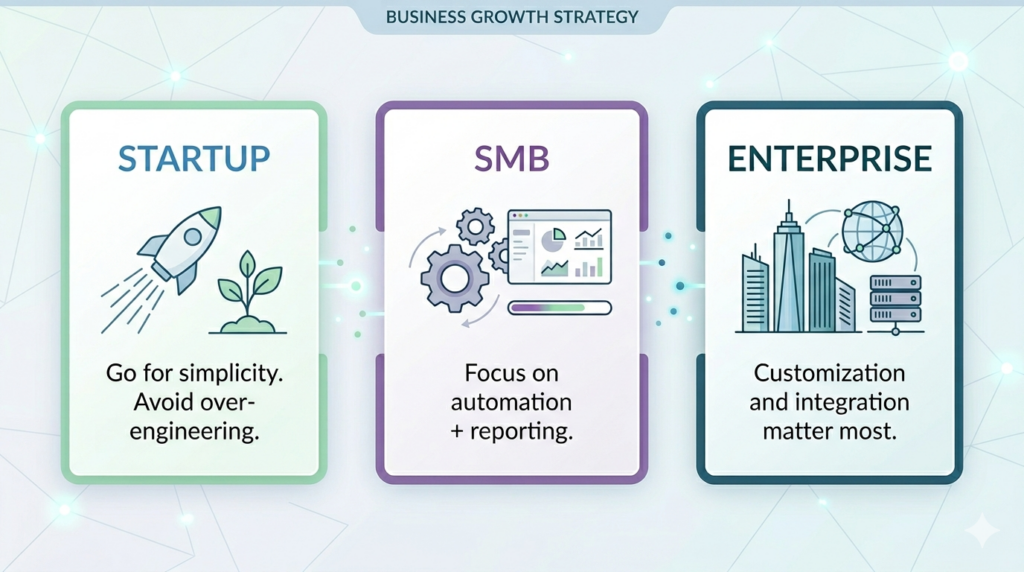
In my experience, most teams choose based on features. The right approach is to choose based on process.
Common mistakes teams make with CRM automation
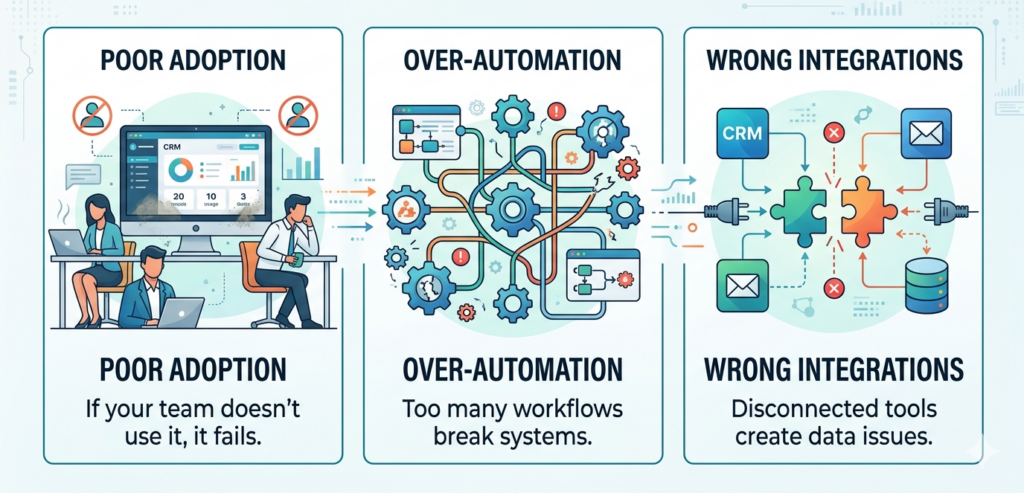
We’ve seen teams lose pipeline visibility because of bad setup.
Final verdict on the best CRM and automation tools for 2026
The best CRM software and automation tools are the ones your team actually uses daily.
- The best CRM and automation tools for 2026 are not the ones with the most features.
- They are the ones your team actually uses.
- If you’re evaluating tools, start with your pipeline gaps—not features.
FAQ
Which CRM is best for small businesses in 2026?
Zoho CRM and HubSpot are strong options for small teams due to cost and ease of use.
What is the best CRM with automation?
HubSpot and ActiveCampaign offer strong automation features.
Which CRM is best for B2B sales teams?
Salesforce and Pipedrive are widely used in B2B sales environments.
Do I need AI in my CRM?
AI helps with insights and automation, but it is not mandatory for all teams.
What should I look for in CRM automation software?
Focus on ease of use, integration, and workflow automation.
Is marketing automation the same as CRM?
No. CRM manages customer data, while marketing automation focuses on engagement.

Want to Collaborate?
Open to guest posts, partnerships, link collaborations, and marketing discussions. If you’re building something interesting, let’s connect.
Connect on LinkedIn